Open source/Rust/MIT/v0.2.0

Give your AI agents
a memory that lasts

memex8 is a self-hosted memory for AI agents that works like a human one: memories fade at different rates depending on what they are, related ideas link themselves, and a nightly “sleep” keeps it tidy. Hybrid keyword + vector search, a web UI with sign-in, REST and MCP — one Docker command.

View on GitHub Quick Start
13-phase nightly sleep cycle 8× smaller vector index 11 Hermes memory tools 100% self-hosted
Core Features

Memory that behaves like memory

Most AI memory treats every fact as equally important forever. memex8 doesn’t: it forgets, connects, verifies and recovers, the way a useful memory should.

Forgets at the right speed

Per-type Weibull decay: a preference fades over months, an event over a week, a request in days. Nothing is ever fully deleted; it just ranks lower.

Hybrid search new on main

Vector similarity plus BM25 keyword matching, so exact names, IDs and rare words are found as well as meanings. Queries are classified by intent (temporal, factual, preference…) and re-weighted, with no LLM on the search path.

Auto-linked associations

Each memory links to its nearest neighbours during the nightly sleep, and recalling one primes the others (spreading activation). Realms self-organise into topic clusters, with no manual tagging.

Compressed vector search

TurboVec (Google’s TurboQuant) stores vectors at 4 bits: 8× smaller, no training, data-oblivious. Qdrant keeps payloads and filters; a coverage check falls back to Qdrant if the index ever goes stale.

Slumber: a nightly sleep cycle

Deduplicate, compress, re-cluster, prune stale memories, link, detect knowledge gaps and verify, in 13 phases. LLM summarising is opt-in, and never touches profile, preference, setup or decision memories.

Verified, certified, recoverable

A nightly sweep rates whether memories are still true. Certify the ones you’ve confirmed to protect them. Consolidation keeps provenance with undo, removed duplicates are journaled, and backups are verified by a restore drill.

Dreams new on main

Opt-in. On a schedule you pick, memex8 weaves a few memories into a short dream and a “waking note” naming one real connection between them. Dreams are fiction, kept apart from your memories and never returned by search. Keep or discard each one.

REST, MCP and agent plugins

Authenticated REST API (/api/v1), an MCP server over stdio and HTTP, a native Hermes Agent memory provider, and a bridge so Claude Code and Codex share one memory across your network.

Private by design

No cloud dependency. Fail-closed API key, argon2id sign-in, and a one-line switch for who can reach it (this machine, your Tailscale IP, your LAN). Run embeddings locally with Ollama and nothing leaves your network.

Web UI

See your agent’s memory

A single self-contained page embedded in the binary: no CDN, no build step, behind your sign-in.
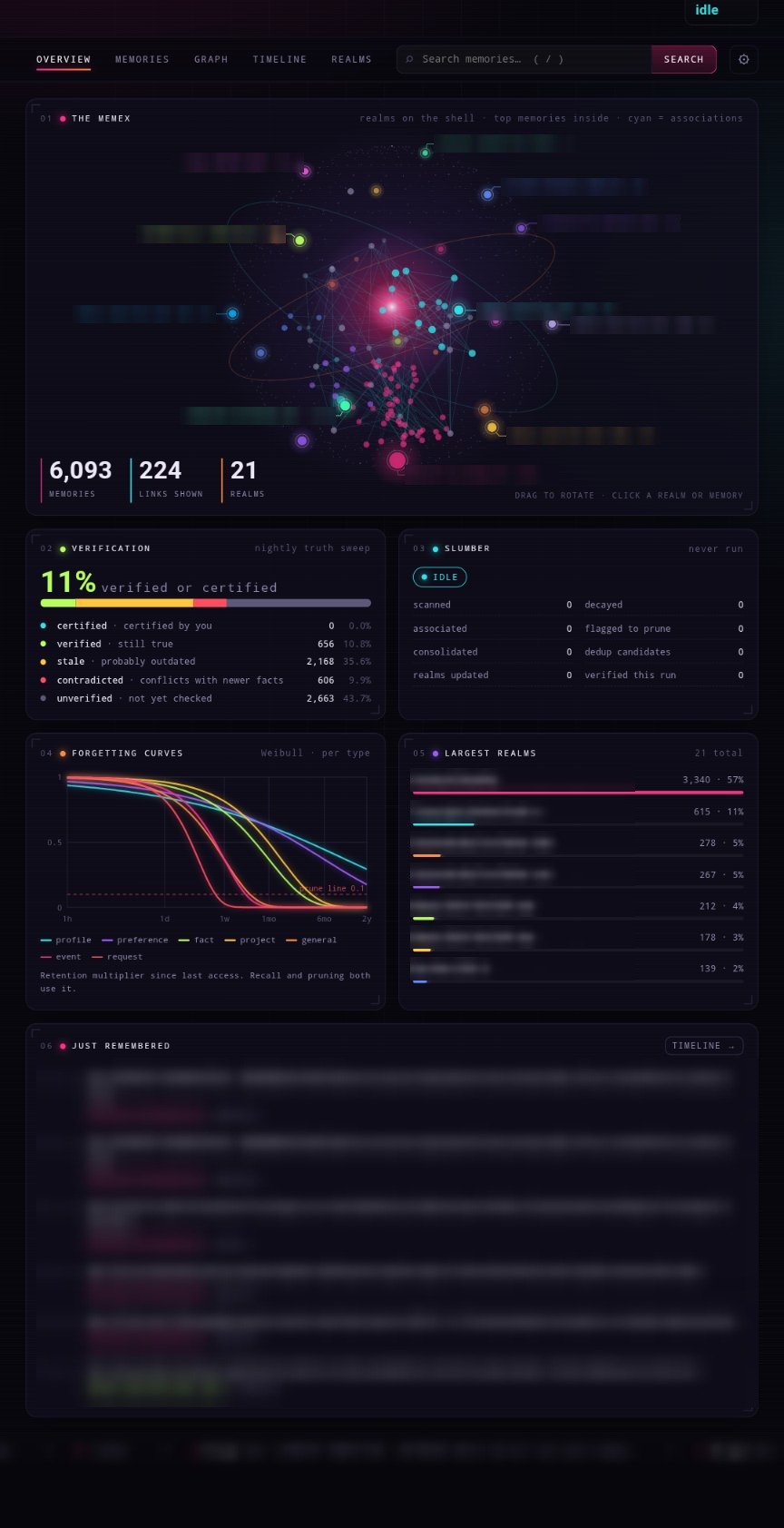
The Overview dashboard with the rotating Memex sphere of realms
The MemexRealms, top memories and association links; verification, slumber and forgetting-curve panels.
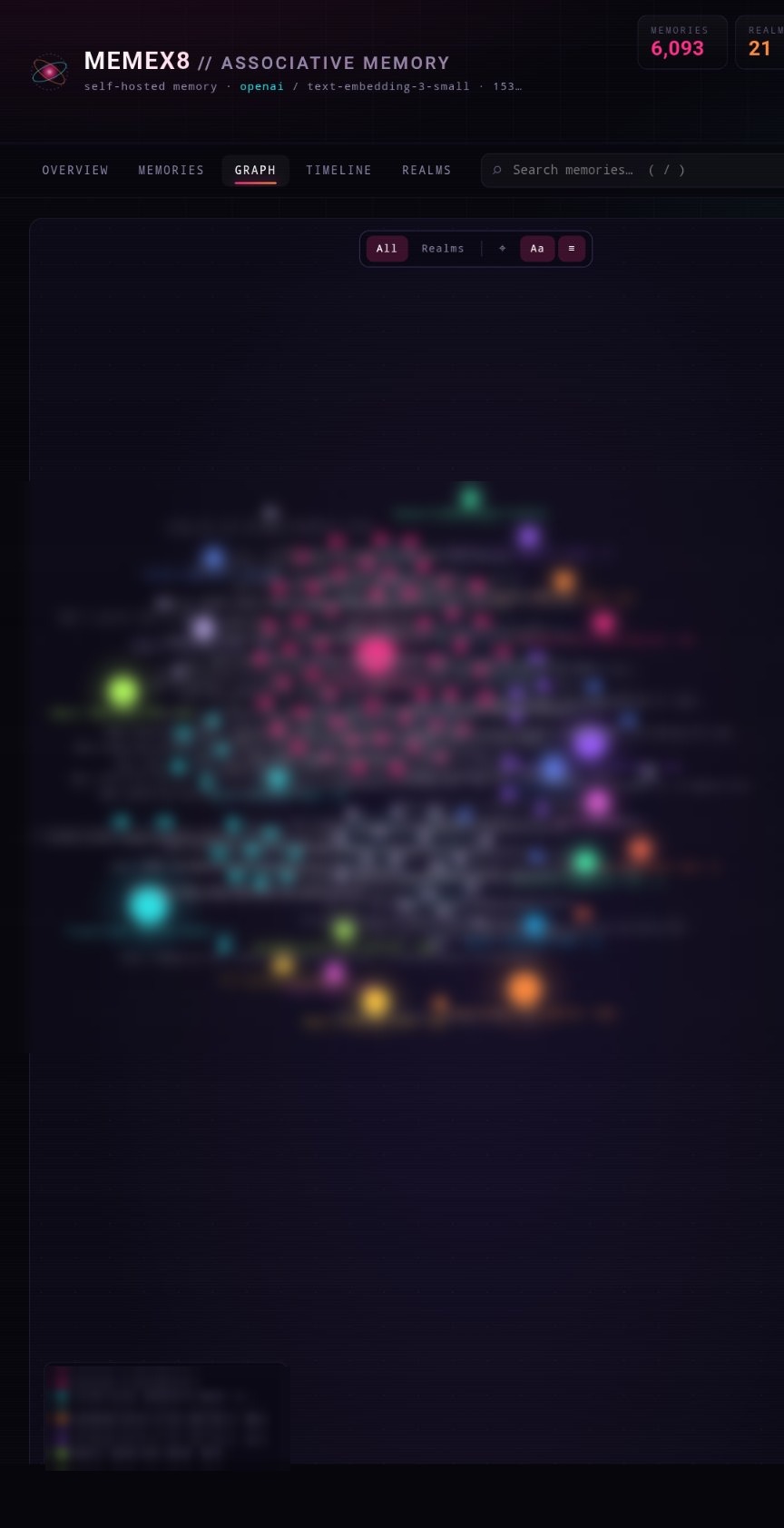
Force-directed graph of memory associations
Association graphA force-directed map of how memories connect. Hover a link to see its strength.
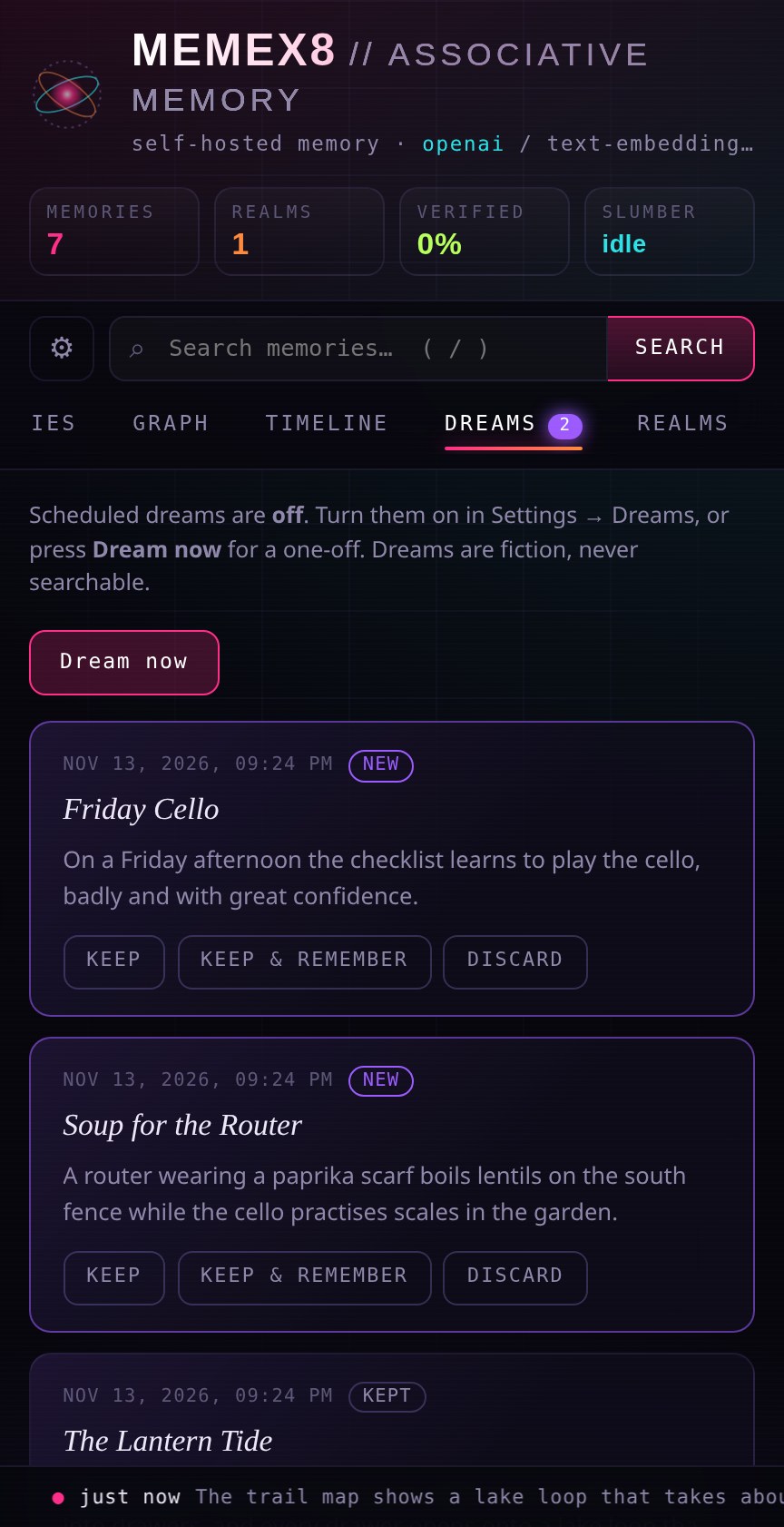
The Dreams tab with pending dreams to keep or discard
DreamsNew dreams wait for you to keep, keep & remember, or discard. (Demo data.)
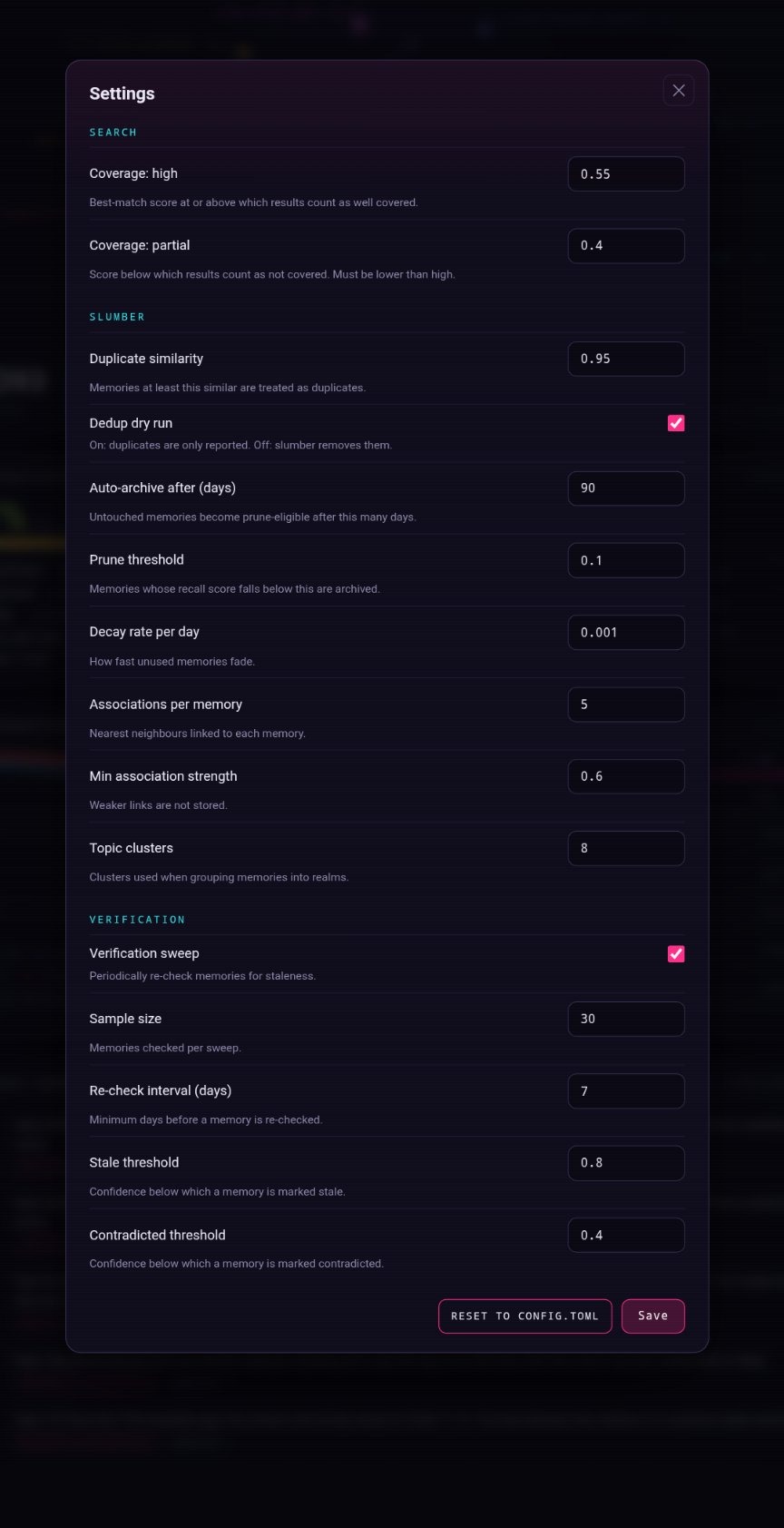
The Settings editor for server tunables
SettingsTune search, slumber, verification and dreams from the browser, range-checked and applied on restart.

Measured, then shipped

memex8 ships a small retrieval benchmark and only makes a change the default once it helps. Here is what changed most recently.

On mainlands in the next release

Keyword + vector hybrid search, on by default

BM25 keyword matches are blended into vector search. Top-15 recall rose from 47.6 to 52.5 on the public MemDerive benchmark, with no test world getting worse. Toggle it in Settings.

Dreams

An opt-in scheduled dream plus waking note, a Dreams tab with review, a memex8_dreams tool so your agent can show you a new dream and ask whether to keep it, and an optional “remember it” that stays out of normal search.

Safer consolidation

LLM consolidation is now a Settings switch and off by default. Even when on, durable types (profile, preference, relationship, setup, instruction, decision, commitment) are never merged into a summary.

A benchmark you can run

bench/memderive replays 1,503 questions across 10 worlds against a throwaway instance and scores retrieval with no LLM judge. A re-check script audits old summaries against their sources, dry-run by default.

Retrieval, top-15 (MemDerive, 10 worlds, 1,503 questions)

SearchSupport recallFull witness
Vector only (before)47.631.9
Hybrid, keyword weight 0.15 (now the default)52.534.0

Support recall is the share of the memories a question needs that appear in the top 15. Full witness means everything needed to answer came back. Data: DeriveMem (CC BY 4.0).

v0.2.0November 13, 2026 · the latest release

Redesigned web UI

A dark HUD dashboard with the Memex sphere, timeline scrubber, association graph and forgetting curves.

Real sign-in

Username and password with argon2id hashing, an HttpOnly session cookie and a lockout after repeated failures. The API key keeps working for agents.

Settings editor and bind control

Edit validated tunables in the browser, and choose who can reach memex8 with scripts/set-bind.sh.

Prebuilt image

ghcr.io/ex8-ca/memex8 (linux/amd64): skip the Rust build entirely.

All releases and notes →

Quick start

Running in a few minutes

Docker with Compose v2 is all you need. Pick how you want to run it.

memex8 — prebuilt image (linux/amd64)
# 1. Get the compose files and configure
git clone https://github.com/Ex8-ca/memex8.git && cd memex8
cp .env.memex8.example .env.memex8 && chmod 600 .env.memex8
cp config.example.toml config.toml
# edit .env.memex8: set MEMEX8_API_KEY (any long random string) and OPENAI_API_KEY
# 2. Start it (pulls ghcr.io/ex8-ca/memex8, no compile)
docker compose -f docker-compose.yml -f docker-compose.ghcr.yml up -d
# 3. Open the web UI
http://localhost:8080
# ...or use the REST API
curl -X POST localhost:8080/api/v1/memories -H "Authorization: Bearer $MEMEX8_API_KEY" \
  -H "Content-Type: application/json" -d '{"content":"Deploys go out on Fridays","memory_type":"fact"}'
curl -X POST localhost:8080/api/v1/memories/search -H "Authorization: Bearer $MEMEX8_API_KEY" \
  -H "Content-Type: application/json" -d '{"query":"when do we deploy?"}'
memex8 — build from source (any architecture)
# 1. Clone and configure
git clone https://github.com/Ex8-ca/memex8.git && cd memex8
cp .env.memex8.example .env.memex8 && chmod 600 .env.memex8
cp config.example.toml config.toml
# edit .env.memex8: set MEMEX8_API_KEY and OPENAI_API_KEY
# 2. Build and start (the first run compiles the Rust binary: a few minutes)
docker compose up -d
docker compose ps  # wait for "healthy"
# 3. Check it, then open the web UI
curl http://localhost:8080/health  # OK
http://localhost:8080
memex8 — local embeddings with Ollama
# 1. Same clone and config steps as above, then in .env.memex8:
EMBEDDING_PROVIDER=ollama
EMBEDDING_MODEL=nomic-embed-text
EMBEDDING_DIMENSIONS=768
OLLAMA_URL=http://ollama:11434
# 2. Start with the local-embeddings profile and pull the model once
docker compose --profile local-embeddings up -d
docker compose exec ollama ollama pull nomic-embed-text
# Zero API cost: embeddings never leave your machine

Choose your embedding model before storing memories: vectors from different models or dimensions aren’t interchangeable. The prebuilt image is for linux/amd64; on arm64 (Apple silicon, Raspberry Pi) build from source. Sign-in, backups and network exposure are covered in the README.

Rust-powered architecture

One binary with the web UI embedded. Qdrant holds payloads, TurboVec holds the compressed vectors.

┌────────────────────┐  ┌──────────────────────────────────────────────┐  ┌────────────────────────┐
│ AI agents          │  │ memex8 engine (one Rust binary)              │  │ Storage                │
│                    │  │                                              │  │                        │
│ Hermes Agent       │  │ per-type Weibull decay                       │  │ Qdrant                 │
│ Claude Code        │  │ hybrid search: vectors + BM25                │  │   payloads + filters   │
│ Codex              │  │ query-intent weighting                       │  │ TurboVec index         │
│ any MCP client     │  │ associations + verification                  │  │   4-bit, 8x smaller    │
│                    │  │ slumber (nightly sleep)                      │  │ Embeddings             │
│                    │  │ dreams (opt-in) · web UI + login             │  │   OpenAI or Ollama     │
└────────────────────┘  └──────────────────────────────────────────────┘  └────────────────────────┘

   REST /api/v1  ·  MCP (stdio + HTTP)  ·  Hermes plugin  ·  Claude Code / Codex bridge

Qdrant + TurboVec

Qdrant stores memories, realms and metadata. The search index is a 4-bit TurboVec file, rebuilt each sleep cycle and validated on load so a stale index can never hide your memories.

OpenAI, compatible APIs or Ollama

Trait-based embedders: text-embedding-3-small (1536d), any OpenAI-compatible endpoint (MiniMax, Together, Groq) via base_url, or nomic-embed-text locally (768d).

Small, testable, documented

MIT licensed Rust with a unit and integration test suite that runs against a disposable Qdrant. Backups are cold, verified and restorable: see docs/BACKUPS.md.

Integrations

Works with your agent stack

One memory, many clients. Point them all at the same authenticated server.

Hermes Agent

Native memory provider · 11 tools · auto-recall

Claude Code & Codex

Stdio MCP bridge · shared over your LAN

Any MCP client

MCP over stdio and HTTP

Obsidian

Optional read-only vault search

Start building agent memory

Clone the repo, run docker compose up, and give your agent a memory that persists across sessions. OpenAI or Ollama — your call.

MIT License — Built with Rust